Mobile medical unit for CSR projects
Deploy branded community-health programmes with screening, consultation and measurable impact dashboards.
A technology-enabled mobile clinic van designed for preventive screening, consultations, telemedicine and configurable diagnostics - built for rural health camps, CSR projects, government outreach, hospitals and multi-location healthcare programmes.
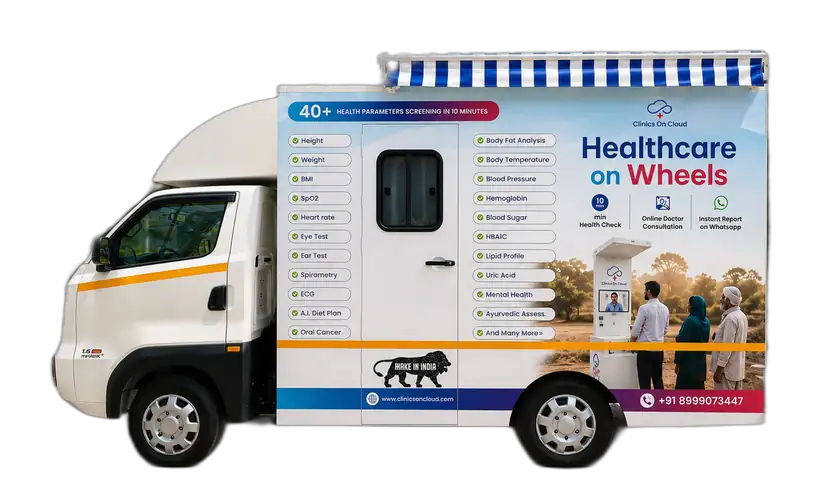
In healthcare, MMU stands for Mobile Medical Unit. It is a specially fabricated medical vehicle - also called a mobile medical van, mobile health van or mobile clinic van - that carries clinical infrastructure to locations where a permanent facility may be unavailable, inconvenient or too far away.
A strong MMU programme combines the vehicle, equipment, digital workflow, staffing and route planning - not just fabrication.
Based on Clinics On Cloud's current standard MMU configuration. Final specifications vary with chassis, equipment and project scope.
Doctor workstation, digital screening, teleconsultation interface and storage.
Patient examination bed, screening devices, privacy and clinical working area.
| Application | Preventive health screening, consultation and patient examination |
| Clinic layout | Two-zone consultation + examination layout |
| Exterior dimensions | Approx. 10 ft L × 5 ft 7 in W × 8 ft 4 in H* |
| Interior dimensions | Approx. 9 ft 7 in L × 5 ft 2 in W × 5 ft 7 in H* |
| Body structure | MS tubular frame with rust- and seepage-resistant construction |
| Exterior paneling | Galvanized steel sheet with minimal joints |
| Interior finish | Hygienic FRP panels with thermal insulation |
| Flooring | Anti-skid flooring over ply base |
| Examination area | Foldable examination table with cushioned patient bed |
| Doctor workstation | Built-in work table with storage |
| Connectivity | 4G / Wi-Fi enabled |
| Report sharing | WhatsApp / Email / Print |
*Dimensions shown are for the current reference configuration and must be reconfirmed for the final vehicle/chassis selected.
Searchers often compare Force Traveller, Tata Winger and bus-based MMUs. The right choice depends on programme size, road conditions, equipment load and patient flow.
The standard unit can combine preventive screening, telemedicine and examination infrastructure. Advanced diagnostics can be added project-wise.
Specialised configurations let the same mobile-health concept support preventive screening, diagnostics and focused public-health programmes.
Deploy branded community-health programmes with screening, consultation and measurable impact dashboards.
Extend care to villages and remote communities through a scheduled route-based clinic-on-wheels model.
Connect field screening to remote doctors and higher centres without requiring every specialist to travel.
Configure the vehicle with higher-end diagnostic modules according to project requirements.
Add vision and ophthalmic screening workflows for targeted community eye-health programmes.
Design an oral-health outreach configuration around dental examination and preventive screening needs.
Add imaging only where equipment, shielding, vehicle design and applicable regulatory requirements are specifically engineered for the project.
Build focused outreach around breast, oral or other screening pathways with defined referral protocols.
MMUs can be configured for government and public-health procurement. Tender-specific technical, staffing and service requirements must be matched to the applicable bid document.
A reliable MMU needs coordinated vehicle selection, structural fabrication, electrical design, insulation, hygienic interiors, storage, patient flow, medical-equipment mounting, power backup, connectivity, branding and commissioning. Clinics On Cloud manufactures its mobile healthcare solutions from Pune, India.
Chassis selection and clinical zoning.
Frame, paneling, insulation and flooring.
Devices, bed, workstation and storage.
Screening software, telemedicine and reporting.
Government and NHM-linked projects can vary significantly by state, programme and tender. The page should capture procurement intent while avoiding claims of universal tender compliance.
Map chassis, dimensions, fabrication, power, equipment and safety requirements line-by-line against the tender.
Create a tender-specific equipment matrix with make/model, specification and required certifications.
Clarify whether the bid is vehicle supply, turnkey equipment supply, operations, staffing, maintenance or an integrated service contract.
A screening-focused MMU may require an operator/technician plus programme staff, while a clinical MMU may require a doctor, nurse, lab technician, driver and other personnel. Government or tender-based staffing must follow the exact scope, qualification criteria, local regulations and clinical protocols specified for that programme.
| Requirement | Mobile Medical Unit | Ambulance |
|---|---|---|
| Primary purpose | Scheduled screening, diagnosis support, consultation and outreach | Emergency response and patient transport |
| Patient flow | Multiple walk-in patients during camps/routes | Usually one transport case at a time |
| Clinic layout | Workstation + examination / diagnostic zones | Emergency treatment and stretcher layout |
| Telemedicine | Can be integrated as a routine care pathway | May be available in advanced emergency systems |
| Best use | Rural outreach, CSR, public health, community diagnostics | Urgent care, emergency stabilisation and transport |
Clinics On Cloud currently lists its standard Mobile Medical Unit at approximately ₹30 lakh + 18% GST. The final MMU cost can vary with vehicle model, medical equipment, diagnostic capabilities, interior configuration and customization.
Current reference pricing. Project-specific customisations, specialised equipment and alternative chassis can change the final quotation.
Vehicle + integrated health setup + clinic interiorDelivery depends on chassis availability, fabrication complexity, imported or specialised equipment, approvals and final customer sign-off. Publish an exact number only after production planning confirms it.
Answered by the team at Clinics On Cloud - the questions people actually search for before they enquire, with the answers they give on the phone.
A Mobile Medical Unit is a specially equipped clinic-on-wheels used to take preventive screening, consultation, telemedicine and selected diagnostics directly to communities and institutions.
MMU stands for Mobile Medical Unit.
Clinics On Cloud currently indicates approximately ₹30 lakh + 18% GST for its standard configuration. Final pricing depends on vehicle, diagnostics, equipment and customisation.
The ideal chassis depends on route conditions, clinical services, equipment load and required interior space. Force Traveller, Tata Winger and larger bus-based platforms can suit different programme sizes.
Yes. The Clinics On Cloud MMU can integrate telemedicine so patients screened in the field can connect with remote doctors and digital records can be shared.
Specialised configurations can be engineered for these services. Equipment, shielding, interior layout, clinical workflow and applicable regulatory requirements need to be considered project by project.
A standard configuration can include an integrated health screening kiosk, examination bed, telemedicine, ECG and point-of-care screening. Advanced equipment is configurable according to the programme.
Yes, an MMU can be configured for government procurement, but compliance must be assessed against the exact tender specification and service scope.
Staffing depends on services and regulations. It may include a doctor, nurse or ANM, screening/lab technician, driver and programme coordinator, or remote-doctor support through telemedicine.
Lead time depends on chassis availability, fabrication scope, medical equipment, software integration and approvals. It should be confirmed in the project quotation after scope freeze.
An MMU is a travelling clinic for scheduled screening and outreach. An ambulance is primarily designed for emergency response, stabilisation and patient transport.
We started Clinics on Cloud with a simple belief - that the quality of your healthcare should not depend on your postcode. Whether you’re a government, corporate, NGO or entrepreneur - we built this for you.
+91 8999 073 447
Mon - Sat · 9 AM to 6 PM IST
sales@clinicsoncloud.com
Partnerships · Deployments · Support
www.clinicsoncloud.com
Products · Case Studies · News
Nighoje, Chakan MIDC
Pune, Maharashtra - 410501, India